Advertisement
Click to download now, finish the installation quickly, and directly unlock the "all-round experience"
Advertisement
Screenshots
Click to download now, finish the installation quickly, and directly unlock the "all-round experience"
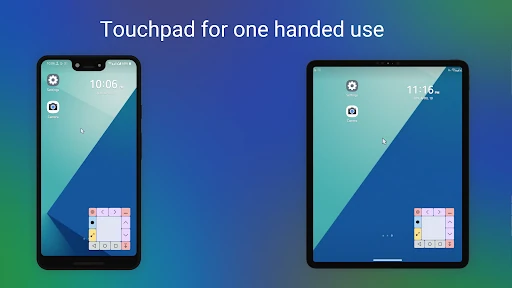
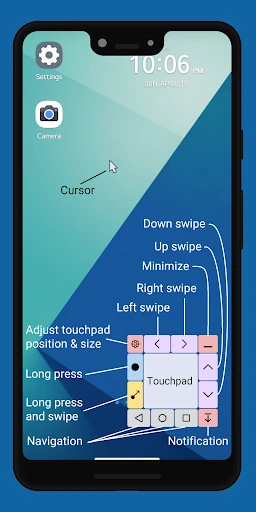
Touchpad for Big Phone & Tab is a sophisticated accessibility utility designed to bridge the gap between increasing mobile screen sizes and the physical limitations of one-handed use. Positioned as a high-utility tool within the Productivity landscape, it effectively transforms the bottom of the screen into a precision control center, complete with a mouse cursor that mimics a desktop experience. By offering a "one-hand mode" that doesn't actually shrink the display content, it provides a superior alternative to native system solutions, making it an essential installation for power users and those using large-format phablets or tablets.
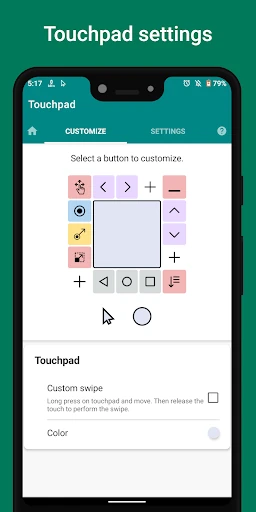
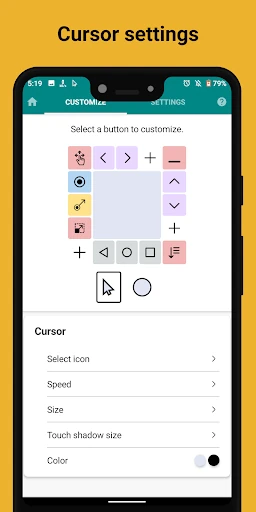
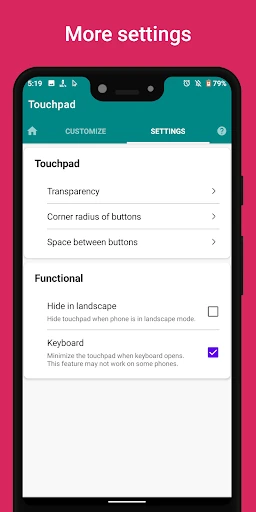
The UI of Touchpad for Big Phone & Tab prioritizes function and adaptability. Its design language is utilitarian, focusing on a non-intrusive floating overlay that feels like a native extension of the Android OS. From a UX perspective, the app excels by offering granular control over the touchpad's physical presence—allowing users to adjust corner radius and spacing. While the initial setup requires granting Accessibility API permissions, the intuitive nature of the "drag-to-move" cursor makes the learning curve remarkably shallow for such a feature-rich productivity tool.
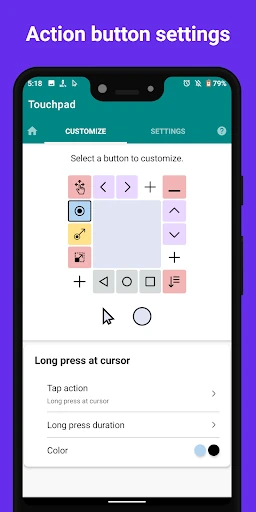
Future updates could benefit from the inclusion of "Smart Profiles," which would allow the touchpad to automatically resize or change transparency based on which app is currently in the foreground. Additionally, introducing haptic feedback triggers for the mouse "click" would enhance the tactile experience, making the virtual cursor feel even more responsive. A tutorial overlay for the "Custom Swipe" feature would also help new users master the long-press-and-drag mechanic more quickly.
Touchpad for Big Phone & Tab is specifically engineered for enthusiasts of large-screen devices and individuals with limited hand mobility. It serves as a powerful bridge between desktop-level precision and mobile portability. For anyone struggling with the ergonomics of modern 6.7-inch+ displays or tablets, this app is a highly recommended productivity enhancer that delivers on its promise of true one-handed operation.